
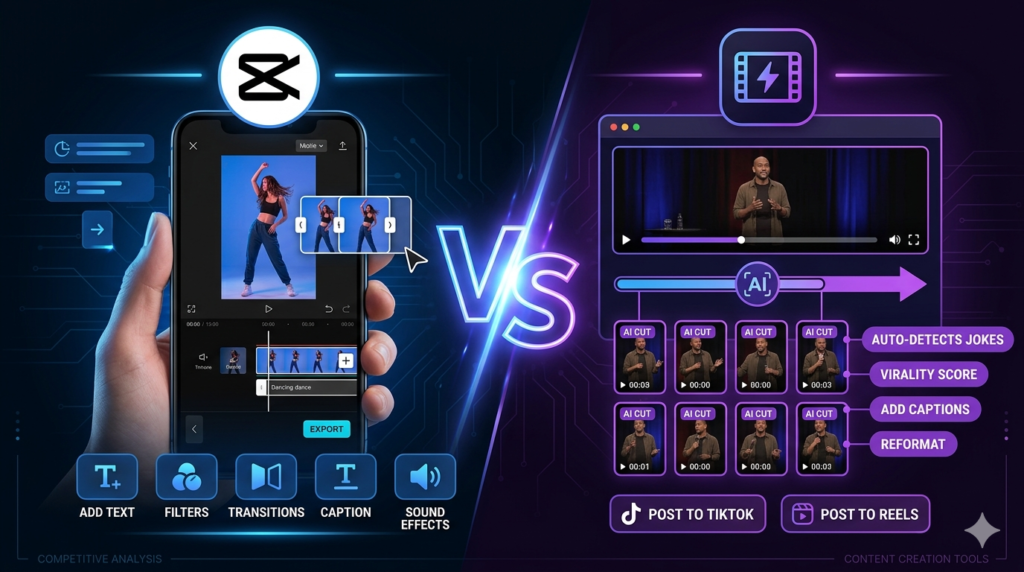
Short-form video isn’t slowing down. If anything, the pressure to post on TikTok, Reels and Shorts every week has never been higher. And the two names that keep coming up are CapCut and Opus Clip.
Here’s what most CapCut vs Opus Clip comparisons miss: they aren’t really competitors. One helps you make short videos. The other helps you pull short videos out of long ones. Pick the wrong one for your workflow and you’ll feel slower, not faster.
Short answer: filming short videos from scratch? CapCut. Turning podcasts and YouTube videos into clips? Opus Clip. Doing both? Use both.
Table of Contents
CapCut vs Opus Clip at a Glance
| CapCut | Opus Clip | |
|---|---|---|
| What it is | A short-form video editor | An AI repurposing tool |
| Best for | Original short videos | Turning long videos into clips |
| Creative control | Full: every cut, caption and effect | Limited: the AI makes most choices |
| Templates | Huge library of trending templates | Very few |
| Auto captions | Yes | Yes, animated by default |
| Reframe to vertical | Manual or assisted | Automatic, follows the speaker |
| Mobile app | Yes, plus desktop and web | Mainly web |
| Free plan | Yes, generous | Yes, 60 credits, watermarked |
The Real Difference: Creating vs Repurposing
CapCut is a full editor. You bring your footage, pick a template, add music, captions, effects and transitions, and shape the video exactly how you want. The AI helps, with auto captions, background removal and smart cuts, but you’re in charge.
Opus Clip works the other way round. You hand it a 45-minute podcast or YouTube video, and it hands you back a batch of vertical clips with captions, each with a score suggesting how likely it is to perform. You’re not editing so much as choosing.
Once you see it that way, the decision gets much easier. Ask yourself one question: where does my content start?
Where CapCut Wins
- You film for TikTok directly. Talking-head clips, tutorials, trends, B-roll.
- You care about a visual style. Fonts, colors and transitions that make your videos recognizable.
- You edit on your phone. CapCut’s mobile app is one of the best around.
- You want templates. Its trending template library helps you look polished without learning a full editor.
Where Opus Clip Wins
- You already make long content. Podcasts, webinars, interviews, livestreams or YouTube videos.
- You want volume. Many clips a week without many hours of editing.
- You hate scrubbing timelines. The AI finds the best moments so you don’t have to watch everything again.
- You record one person talking. Its auto reframe is excellent for talking heads (less so for groups and fast motion).
Want the full breakdown? Read our Opus Clip review.
The Workflow Most Creators End Up Using
You don’t have to choose. A very common setup looks like this:
- Record your long video or podcast as usual.
- Run it through Opus Clip to find the best five to ten moments.
- Bring your favorite clips into CapCut for final polish: your fonts, music and a stronger hook.
- Schedule them across the week.
Opus Clip does the heavy lifting. CapCut does the finishing touches. That’s how you get volume without your clips all looking the same.
Pricing
| Plan | CapCut | Opus Clip |
|---|---|---|
| Free | Yes, with limits on some AI features | Yes, 60 credits a month, watermarked |
| Main paid plan | Pro, listed at $19.99/month or $179.99/year on CapCut’s US page | Starter $15/month; Pro $29/month or $14.50/month yearly |
Both free plans are good enough to test properly. Upgrade only when you keep hitting the limits.
Questions People Usually Ask
Is CapCut or Opus Clip better for TikTok?
For original TikTok content, CapCut. For turning long videos into TikToks, Opus Clip.
Can CapCut turn long videos into clips automatically?
It has some AI tools that help, but it isn’t built for it. Finding and cutting the best moments from a long video is exactly what Opus Clip does best.
Do I need to pay for both?
Not at first. Many creators use Opus Clip’s paid plan and CapCut’s free plan, which covers most finishing touches.
The Verdict
⭐ For creating short videos from scratch: CapCut.
⭐ For repurposing long content: Opus Clip.
⭐ For the most efficient workflow: both together.